
I run a bunch of apps on a VPS, all exposed through Cloudflare Tunnels. The problem: some of those apps have no auth, or auth that's annoying to set up (OAuth apps, API keys, invite flows). I wanted something simpler: if you're on my list, you get in. If not, you don't.
Cloudflare Zero Trust Access does exactly this, and it sits in front of your tunnel so your app never even sees unauthorized traffic.
The setup
I had a self-hosted chat app running on port 8400 behind a Cloudflare Tunnel. The app itself has OpenID Connect support, but that means everyone needs an account with the OIDC provider. My family doesn't have those.
The existing tunnel config already had a public hostname pointing chat.example.com to localhost:8400. Traffic was flowing, just unprotected.
Adding Zero Trust Access
Go to one.dash.cloudflare.com → Access → Applications → Add an application.
Pick Self-hosted, set the domain to your public hostname:
Application domain: chat.example.com
Then create a policy:
- Policy name: whatever you want
- Action: Allow
- Selector: Emails
- Value: add each email you want to allow
That's it on the Cloudflare side.
How it works
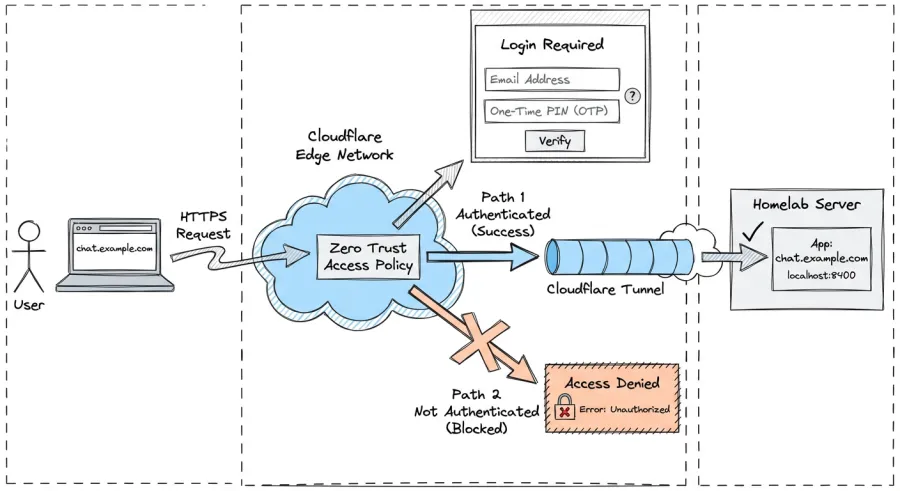
What happens now
When someone hits chat.example.com, Cloudflare intercepts the request before it reaches your server. They see a login page, enter their email, get a one-time PIN, enter it, and they're through. Cloudflare sets a CF_Authorization cookie and passes the request to your app.
The request flow looks like:
User → Cloudflare Edge → Access check → Tunnel → localhost:8400
                           ↓
                    (not on the list? blocked here)
Your app sees nothing. No auth headers to parse, no middleware to add, no OAuth dance. The app can run completely open because Cloudflare handles the gate.
Disabling app-level auth
Since Cloudflare handles auth, you can strip out whatever login your app ships with — OIDC, OAuth, magic links, whatever. One gotcha: if the app's Docker image has auth defaults baked in, deleting the lines from your env override file won't actually disable them. The image defaults kick back in. You need to explicitly set every auth-related variable to an empty string so the app treats them as "not configured."
Session management
Sessions last as long as you configure in the Access application settings. Users can log out by visiting:
https://chat.example.com/cdn-cgi/access/logout
You can revoke sessions from the Zero Trust dashboard under Logs → Access Requests.
Gotchas
Cookie settings
If you had COOKIE_SECURE=true set for your app's own auth, keep it. Cloudflare terminates TLS at the edge, so the cookie still needs the secure flag when traveling between the browser and Cloudflare.
This works for any app
The nice thing about this approach is it's app-agnostic. I could put the same Access policy in front of any service behind my tunnel: Stirling PDF, Pocketbase, whatever. No code changes to any of them.
Cost
Free. Cloudflare Zero Trust includes 50 users on the free tier. For a homelab shared with family and friends, that's more than enough.
Cloudflare Tunnels: developers.cloudflare.com/cloudflare-one/connections/connect-networks
Zero Trust Access: developers.cloudflare.com/cloudflare-one/policies/access